Hourly Time Planner Template
Eight o'clock arrives with a familiar tension. Two meetings, a project deadline, groceries to buy, and somehow a workout to squeeze in. By midday, the list feels overwhelming, and by evening, half the tasks remain untouched. This experience is all too common when intentions meet unstructured hours. The solution is not more time, but a clearer framework for the time already available. The Hourly Time Planner Template exists to fill that gap, offering a practical, visual approach to organising each segment of the day without the complexity of digital tools.
What the Hourly Time Planner Template Offers
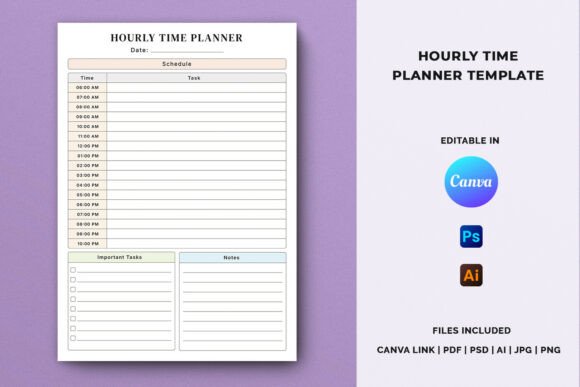
At its core, the Hourly Time Planner Template is a structured layout that divides the day into hourly blocks. Each block provides dedicated space for scheduling specific activities, alongside areas for noting your most important tasks and capturing quick thoughts or reminders. Unlike generic daily planners that only list tasks, this template forces a realistic conversation with time: each hour holds only sixty minutes, so commitments must fit within genuine capacity.
The template is designed with three core sections per day:
- Hourly Schedule — A vertical timeline from early morning through evening, with each hour clearly marked for assigning meetings, focused work, meals, or breaks.
- Important Tasks — A prioritised list for up to three to five critical items that must be completed, separate from the hourly flow.
- Notes — An open area for side thoughts, follow-ups, or context that doesn't fit neatly into the schedule.
This separation is what makes the template particularly effective. You are not just logging activities; you are distinguishing between structured commitments and flexible priorities, while leaving room for the unexpected.
Who Benefits Most from This Planning Approach
The Hourly Time Planner Template serves a wide audience because time management is a universal need, but certain groups will find it especially valuable.
- KDP low-content publishers — Those creating printable planners for Amazon can use this template as a ready-made interior, saving design time while offering buyers a proven structure.
- Printable planner businesses — Etsy sellers and digital product creators can brand the template, adjust the aesthetic, and resell it as part of a larger productivity bundle.
- Designers and entrepreneurs — Freelancers juggling client work, administration, and personal projects benefit from the hourly view to protect deep work windows.
- Students — University life involves lectures, study sessions, and deadlines across different subjects; an hourly layout mirrors a timetabled semester structure.
- Individuals building personal planning systems — Anyone who has tried bullet journals or digital apps but craves a simpler, paper-based system will appreciate the template's directness.
The template is not limited to one environment. It works equally well for daily scheduling in an office, mapping out a study timetable, coordinating workflow across a small team, or managing household routines. Its strength lies in its adaptability.
Real-World Scenarios and Practical Applications
Consider a freelance graphic designer who takes on three client projects simultaneously. Without structure, mornings vanish into email responses, afternoons fragment into revisions, and evenings become catch-up time. Using the Hourly Time Planner Template, the designer blocks 9:00–11:00 for deep creative work, 11:00–12:00 for client calls, and 14:00–16:00 for administrative tasks. The Important Tasks section holds the three deliverables that must leave the desk today. Notes capture feedback points from the morning call. The result is a day with clear boundaries, less mental load, and a visible record of what actually happened.
A university student preparing for final exams presents another scenario. The template accommodates lecture hours, library blocks, and necessary breaks. Tuesday might show 08:00–10:00 lecture, 10:00–12:00 revision, 12:00–13:00 lunch, and 13:00–16:00 past papers. Important Tasks include reviewing key formulas and completing one practice exam. Notes hold questions for the tutor. This hourly view prevents the common mistake of planning too few activities or overloading unscheduled hours.
For a small business owner launching a product, the template becomes a coordination tool. Production calls, supplier emails, marketing reviews, and staff check-ins each receive a dedicated hour. The Important Tasks section highlights launch-critical actions, while notes track last-minute adjustments. The hourly plan replaces scattered sticky notes and fragmented calendar alerts with one consolidated view.
Strengths of the Hourly Time Planner Template
The design carries several distinct advantages that explain its popularity among productivity enthusiasts and commercial publishers.
- Encourages realistic planning — Because each hour is physically limited, you cannot overcommit. The template naturally promotes honesty about what can be achieved in a day.
- Separates priorities from schedule — Important Tasks sit outside the hourly flow, ensuring critical items are not buried within meeting slots or forgotten during busy periods.
- Works for paper and digital use — The layout is equally effective when printed and filled by hand, or when opened in a PDF editor or design tool for digital planning.
- Supports habit building — Using the same structure daily trains the brain to anticipate planning. Over time, the template becomes a ritual that signals the start of a focused day.
- Fully editable source files — Publishers and creators can rebrand the template, change fonts, adjust colours, or modify the hourly range to fit different audiences.
Considerations and Limitations to Keep in Mind
No planning tool is perfect for every person or situation, and the Hourly Time Planner Template has characteristics worth understanding before adopting it.
First, the hourly format works best for days with varied activities. If your work involves the same routine every day, the template may feel repetitive rather than helpful. In such cases, you might use only the Important Tasks and Notes sections while ignoring the hourly grid.
Second, some people find hourly scheduling too rigid. Creative professionals or those in reactive roles—such as customer support or emergency services—cannot predict how each hour will unfold. For them, the template might cause frustration when the plan inevitably breaks. A looser daily layout with open time blocks may suit them better.
Third, the template requires a few minutes of upfront planning each morning or evening. Users who skip this step often abandon the system. The template's value is proportional to the consistency of its use.
Fourth, while the A4 size is standard and print-friendly, it may feel large for pocket or on-the-go use. Some users may prefer a half-size or A5 version. If you are a publisher, offering multiple sizes could broaden your market.
Editing and Customization: What You Can Do
One of the most appealing aspects of this product is the flexibility it offers to creators. The Hourly Time Planner Template is provided in multiple formats, including Canva template link, AI, PSD, JPG, and PNG. This means you can edit using free or professional tools depending on your skill level and budget.
Inside the ZIP file, you will find:
- A Canva template link ready for browser-based editing
- Editable Adobe Illustrator and Photoshop files
- High-resolution JPG and PNG for quick use
- A PDF instruction guide walking you through the entire customization and export process
The included PDF is especially useful for newcomers. It explains how to change text, swap colours, insert your branding, and export the final design as a print-ready CMYK file or digital PDF. The instructions assume no prior design expertise, making the template accessible to anyone who follows the steps.
The file specifications are optimised for KDP requirements: 300 DPI resolution, CMYK colour mode for professional printing, and A4 dimensions that match Amazon's standard trim sizes. If you plan to sell on Etsy or Gumroad, the same files work seamlessly with minor adjustments.
How to Choose the Right Hourly Planner for Your Needs
Before committing to any hourly planner template, consider a few questions to ensure it matches your workflow or your target audience's expectations.
- What time range do you need? Some templates start at 6:00 and end at 21:00. Others cover 8:00 to 18:00. Ensure the hourly span fits typical waking hours for the intended user.
- Is the Important Tasks section large enough? If you routinely have more than five priority items, you may need extra space or a companion page.
- Does the Notes area suit your style? Some people prefer lined notes, others prefer blank space for sketching. The template's flexibility allows both, but check the sample.
- Will you use it digitally or on paper? If printing, confirm the file is CMYK and at least 300 DPI. If using digitally, ensure the template is compatible with your preferred app or tablet software.
- Can you brand it easily? Look for templates with clearly labelled layers, editable text, and a simple colour palette. The included instruction PDF should clarify the editing workflow.
Taking a few minutes to evaluate these points saves time later and ensures the template becomes a genuine productivity tool rather than an unused download.
Final Thoughts on the Hourly Time Planner Template
The Hourly Time Planner Template succeeds because it respects a simple truth: time is finite, and how we allocate it determines our effectiveness. By combining an hourly schedule with a priority list and a notes section, it offers a complete daily planning system in one page. It does not try to replace calendars or project management tools. Instead, it fills the gap between vague to-do lists and overscheduled calendars, giving you a deliberate structure that supports focus and clarity.
For creators and publishers, the value extends beyond personal use. The editable source files, clear instructions, and print-ready specifications make it a practical product for KDP, Etsy, and other marketplaces. With minimal customization, it can be repurposed for students, professionals, parents, or entrepreneurs. The same template that helps a designer manage client deadlines can help a student prepare for exams—and can be sold to both audiences.
If you are looking for a way to bring order to chaotic days, or a reliable product to add to your publishing catalogue, the Hourly Time Planner Template is a foundation worth exploring. Start with the instruction PDF, customise the design to reflect your brand or personal style, and experience how a structured hour-by-hour view can transform a day from reactive to intentional.