Cute Creatures Procreate Pattern Brush: A Technical Deep Dive into Seamless Line Art Design
Understanding the Role of Specialized Brushes in Digital Surface Design
The landscape of digital illustration has shifted dramatically in recent years, with tools like the Cute Creatures Procreate Pattern Brush representing a convergence of traditional line art principles and modern digital convenience. For designers, hobbyists, and publishers alike, the ability to generate repeatable, high-contrast pattern fills directly within Procreate transforms how we approach coloring book interiors, surface patterns, and print-on-demand products. Rather than manually constructing tiles or relying on complex desktop software, this brush offers a streamlined path from concept to finished, seamless design.
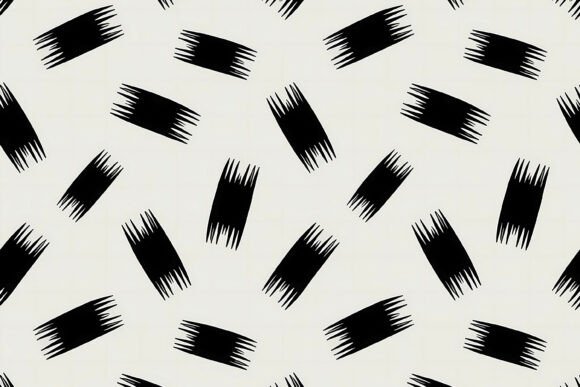
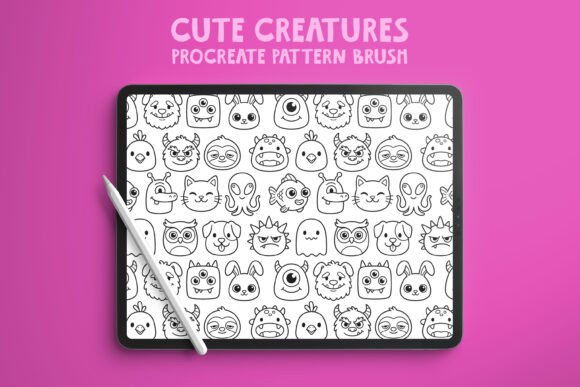
What distinguishes a pattern brush from a standard drawing brush is the mathematical precision embedded in its construction. Every stroke repeats at defined intervals, creating a tile that can fill any canvas edge-to-edge without visible seams. When that brush also incorporates bold, clean black line art with no gray tones, no shading, and no shadows, the result is a tool purpose-built for crisp, reproducible work. The Cute Creatures Procreate Pattern Brush exemplifies this approach, having been initially generated with AI assistance and then manually refined in Photoshop to achieve smooth, uninterrupted linework.
Technical Characteristics of the Brush and Its Line Art
At its core, this brush delivers a pure black line with zero variation in opacity or value. This may sound simple, but it is a deliberate and critical feature for several professional use cases. Coloring book interiors, for example, demand that every outline be solid and unambiguous so that coloring remains within boundaries and the final printed page looks clean. Gray tones, shading, or soft edges introduce print inconsistencies and make coloring more difficult, especially for younger audiences or those using markers that bleed.
The absence of shading also ensures that the pattern remains visually consistent when tiled. If a brush included variable opacity or soft edges, overlapping strokes at tile boundaries would create darker spots or visible seams. By keeping every line uniformly black and sharply defined, the seamless pattern maintains its integrity regardless of how many times it repeats. This is the same principle used in professional vector pattern design, but executed here within Procreate's raster environment for immediate, intuitive use.
Another notable characteristic is the bold line weight across all creatures. Thick lines hold up well at various scales, whether the pattern appears on a phone case, a notebook cover, or a full page in an Amazon KDP coloring book. Thin lines can become lost or appear fragile when printed on textured paper or fabric; bold lines remain legible and define shapes clearly. The creatures themselves are designed with simple, recognizable silhouettes and expressive features, which makes them suitable for both children and adults.
How the Brush Integrates into a Professional Workflow
For creators working in Procreate, the ability to create seamless, high-quality pattern fills in seconds rather than hours is a tangible productivity gain. Traditional tile creation in Procreate typically involves drawing a motif, duplicating it, offsetting the canvas, filling gaps, and then testing the repeat—often a multi-step process that requires patience and precision. With a dedicated pattern brush, the repeat logic is embedded in the brush itself. You simply select the brush, choose a color (black, in this case), and stroke across your canvas. The pattern emerges instantly, fully tiled and ready to use.
This workflow is especially valuable when designing coloring book interiors and backgrounds. Instead of placing individual motifs one by one, you can fill entire pages with a cohesive pattern that provides context and visual interest without overwhelming the coloring subject. For example, a page featuring a large central creature for coloring can be surrounded by a smaller repeating pattern of stars, flowers, or companion creatures that the user can also color. The bold black lines ensure that the background pattern doesn't fade into the page or compete with the main illustration.
In surface design and print-on-demand, the brush enables rapid prototyping. Want to see how the pattern looks on a notebook? Fill a rectangle with the brush, apply a mockup, and assess immediately. Need to adjust scale or density? Change brush size or spacing in the brush settings and stroke again. This iterative speed is a competitive advantage for creators who publish across multiple platforms and need to produce cohesive collections quickly.
Real-World Applications Across Different Creative Projects
The versatility of the Cute Creatures Procreate Pattern Brush becomes apparent when you consider the range of projects it can support. Each application leverages the same underlying technical strengths but serves a different end goal.
Coloring Book Interiors and KDP Publishing
For authors and illustrators publishing on Amazon KDP, interior quality directly impacts reviews and sales. Readers expect clean, bold lines that do not bleed through pages when colored with markers or crayons. The brush's pure black line art, with no gray or shading, prints sharply on standard paper stocks used by KDP. Additionally, because the pattern is seamless and repeatable, you can generate dozens of background variations from a single brush, maintaining thematic consistency across a book series. A forest-themed coloring book might use a pattern of cute woodland creatures; an ocean book would feature sea creatures; a fantasy book could incorporate dragons and unicorns—all from the same brush format but with different motif sets.
Print-on-Demand Products
POD platforms like Redbubble, Society6, and Printful allow creators to upload designs that appear on phone cases, notebooks, tote bags, mugs, and fabric. Each product has its own shape and aspect ratio, which makes seamless pattern fills extremely practical. Instead of designing a custom layout for every product variation, you can create a single seamless pattern tile and apply it across the entire product line. The bold black line art remains crisp even when scaled to fit small items like card holders or large ones like duvet covers. The cute creature motifs appeal to a broad demographic, from children's products to whimsical stationery for adults.
Digital Papers and Scrapbooking
Digital paper designers often produce themed collections of 12x12 inch sheets for scrapbooking, card making, and printables. The brush simplifies this process by allowing the designer to create a seamless fill, export it as a high-resolution PNG or JPEG, and immediately use it as a digital paper. Because the brush is designed for repeatability, the resulting paper has no visible seams or awkward edges. Designers can also layer multiple patterns—for instance, a background pattern of small creatures with a larger creature placed as a focal element on top—by using different brush sizes or combining the brush with standard drawing tools.
Considerations for Optimal Use and Customization
While the brush is designed for immediate use out of the box, understanding a few key settings can help you tailor it to specific projects. Procreate allows you to adjust brush size, spacing, and rotation. Increasing the spacing creates more distance between motif repeats, which can produce a lighter, airier pattern. Decreasing spacing yields a denser fill. You can also rotate the stroke direction to change the pattern's orientation, which is useful when filling irregular shapes or matching a specific layout.
Because the brush contains AI-assisted origins refined in Photoshop, the linework has already been cleaned and smoothed. However, if you want to modify individual motifs—for example, removing one creature type from the repeat—you would need to edit the brush source. Procreate's brush editor allows you to import a new Apple Brush file or modify existing attributes, but editing the actual image content within the brush is limited. For advanced customization, you can export a sample tile as a PNG, edit it in another app, and then reimport it as a new brush. This workflow retains the seamless quality while giving you full creative control.
Another important consideration is canvas resolution. For print projects, aim for at least 300 DPI at the final output size. A 3000x3000 pixel canvas at 300 DPI yields a 10x10 inch area, which is suitable for most coloring book pages and digital papers. If you need a larger pattern area, increase the canvas dimensions proportionally. The brush will scale accordingly, and because the line art is pure black, there is no risk of antialiasing artifacts or soft edges at high resolutions.
Who Benefits Most from This Brush
The brush's design makes it accessible to a wide audience, but certain user groups will find it especially valuable. Coloring book publishers and KDP authors save significant time by generating consistent, high-quality interiors without manual tiling. Surface pattern designers can use it as a foundation for collections, layering additional elements or color as needed. Print-on-demand sellers benefit from the ability to create product-ready designs quickly, especially when launching multiple items. Hobbyists and educators can use the brush to create custom coloring pages for classroom activities, party favors, or personal relaxation, without needing advanced illustration skills.
For professional illustrators, the brush serves as a productivity tool rather than a replacement for original work. They might use it for backgrounds, filler patterns, or preliminary layouts while developing more detailed custom illustrations. The bold, clean line art style also aligns well with modern vector aesthetics, making it suitable for commercial projects that require a consistent, polished look.
Practical Examples of Pattern Application
Consider a creator preparing a 50-page coloring book for KDP. They want each page to have a unique background pattern that complements the central image. Using the Cute Creatures Procreate Pattern Brush, they can create five or six base patterns—each with a different arrangement of creatures—and then vary the scale, rotation, or orientation for each page. This gives the appearance of customized backgrounds while requiring only minimal brush adjustments. The same approach works for a seamless pattern design collection: a set of digital papers with coordinated motifs that share a consistent line-art style.
Another example involves a POD seller creating a line of phone cases and notebooks. They select the brush, set the canvas to the product's aspect ratio, fill the background with the pattern, and then export. The seamless tile ensures that the design wraps around curved surfaces without awkward cuts or visible repetition boundaries. If the seller wants to offer multiple color variants, they can change the line color from black to any solid hue, though the brush's design is optimized for the high contrast that black provides.
Technical Limitations and Compatibility
It is important to note that the brush can only be used with the Procreate app. This means it is exclusive to iPad users running iOS or iPadOS. For creators who work across multiple devices or prefer desktop applications like Photoshop or Affinity Designer, the brush cannot be directly utilized. However, you can export seamless pattern tiles created in Procreate and then use them in any software that supports raster images. This makes the brush a valuable tool within a broader cross-platform workflow, even if its native environment is limited.
Additionally, because the brush produces raster line art, scaling it significantly beyond its original resolution base may introduce pixelation. To avoid this, always create your pattern tile at the largest resolution you anticipate needing. For print projects, this typically means working at 300 DPI with canvas dimensions of at least 2000 to 4000 pixels per side. Testing a small sample at full size before committing to a final design is a prudent practice.
Final Observations on Workflow and Creative Potential
The Cute Creatures Procreate Pattern Brush occupies a specific niche: it automates the technically demanding task of creating seamless, bold line-art patterns while leaving the creative decisions—color, scale, composition, and application—firmly in the hands of the designer. This balance between automation and artistic control is what makes specialized pattern brushes so useful. They eliminate repetitive manual work without dictating the final aesthetic.
For someone who routinely produces coloring books, surface designs, or POD products, the time saved per project can be substantial. More importantly, the consistency of the output ensures that every design meets the same standard of clean, print-ready quality. Whether you are a seasoned professional or exploring pattern design for the first time, understanding how to integrate a tool like this into your workflow opens up new possibilities for rapid experimentation and polished production.